How to Use the GameSir G7 HE
Basically, the G7 SE, but with micro-switch facebuttons.
製品概要
主な機能
- • Anti-drift Hall Effect sticks
- • Precision-tuned Hall Effect analog triggers
- • Two lockable back buttons
- • Fully software-customizable
技術仕様
- • Working Platform: XBOX Series X|S, XBOX One, Windows 10/11, Android
- • Connection: USB-C Wired
- • Weight: 221 g
- • Supported Software: GameSir Nexus app
システム要件
XBOX
XBOX One, XBOX Series X|S Wired
Windows
Windows 10/11 Wired
はじめに
Wired Connection
Plug the detachable USB-C cable into the controller, connect the other end to your XBOX or PC.
Short press the Home button to power on. The white indicator light will remain solid when connected.
Hold XBOX Button + Share Button to switch input modes
-
Hold the View + Menu + XBOX buttons until the USB-C cable is inserted into the PC's USB port, then the indicator will slowly blink white.
-
Ensure that LT & RT and the left & right sticks are not touched. Then Press the A button. The indicator will go out.
-
Press LT & RT to their maximum travel. Rotate the sticks at their maximum angles for 3 times. Press the A button. The indicator becomes solid white to indicate the calibration is over.
-
After the calibration is over, it's required to unplug and re-plug the controller before using.
If the controller encounters issues such as being unable to power on or off properly, you can Hold View Button + Menu Button + M Button till the logo Button blink, then hold XBOX Button 3 seconds. This action will reset the profile and all the settings of the controller.
上級チュートリアル
Extra Button Mapping
The G7 SE features two extra lockable back buttons (R4/L4), allowing you to customize your controls.
Profile Switch
- M + Y = Default Profile
- M + B = Profile 1
- M + A = Profile 2
- M + X = Profile 3
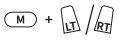
Enable / Disable Hair Trigger Mode
Hold the M + LT / RT for 2s
Volume Adjustment
Adjust Master Volume
Hold the M button + D-pad Up/Down (10 levels in total)
Note: You'll hear a beep when reaching the maximum or minimum level.
Adjust Game/Voice Balance
Hold the M button + D-pad Left/Right
Left: increase game volume, decrease voice volume. Right: Decrease game volume, increase voice volume.
Note: You'll hear a beep when reaching the maximum, middle, or minimum level.
Mute Function
Press the Mute button to turn on the mic mute function (indicator turns red). Press it again to turn it off (indicator turns off).
Note: When the Mute function is turned on, hold the Mute button to temporarily turn it off. Release the Mute button to turn it back on.
FAQ
It supports XBOX Series X|S, XBOX One and Windows 10/11.
Wired, with 3m detachable USB-C cable.
Yes, it features Hall Effect analog triggers with GameSir precision-tuned technology, offering 100% Response Area and best-in-class performance. There’s also a quick switch to hair trigger mode by holding M+LT/RT until the corresponding trigger vibrates, perfect for FPS and action games.
Yes, the micro switch design ensures a lifespan of 3 million presses, with each press delivering clicky feedback.
There are 4 rumble motors in total, one in each grip and trigger.
The algorithm-optimized sticks have 0 Fluctuation, 0 Deviation, and 0 Circularity error. You can easily set a 0 dead zone and switch between Default and the exclusive “Raw” mode via the elite GameSir Nexus software. The anti-friction glide rings also provide super-smooth stick control.
You can create 3 controller profiles by mapping buttons, fine-tuning sticks & triggers, configuring vibration, and more. Specifically for the sticks, you can set no dead zone and switch between Default and our exclusive “Raw” mode. For the triggers, you can set impulse triggers for all games.
Yes, you can use simple button combinations to switch them. Press the M + A/B/X/Y buttons in sequence to switch to the corresponding profile. M + Y = Default M + B = Profile 1 M + A = Profile 2 M + X = Profile 3
*It’s for adjusting your headset’s volume. You need to plug in your headset for volume control.
Hold the M button+D-pad’s Up/Down to Increase/Decrease the Master Volume. (10 levels in total) *There will be a beep when adjusting to the maximum/minimum level.
Hold the M button+D-pad’s Left/Right to Increase game volume while Decreasing voice chat volume/Decrease game volume while Increasing voice chat volume.
*There will be a beep when adjusting to the maximum/middle/minimum level.


近日公開...
この記事は役に立ちましたか?
役に立ったかどうか、または追加情報が必要かどうかをお知らせください。