
Tutorial: How to Use GameSir GM500 Wired Gaming Mouse



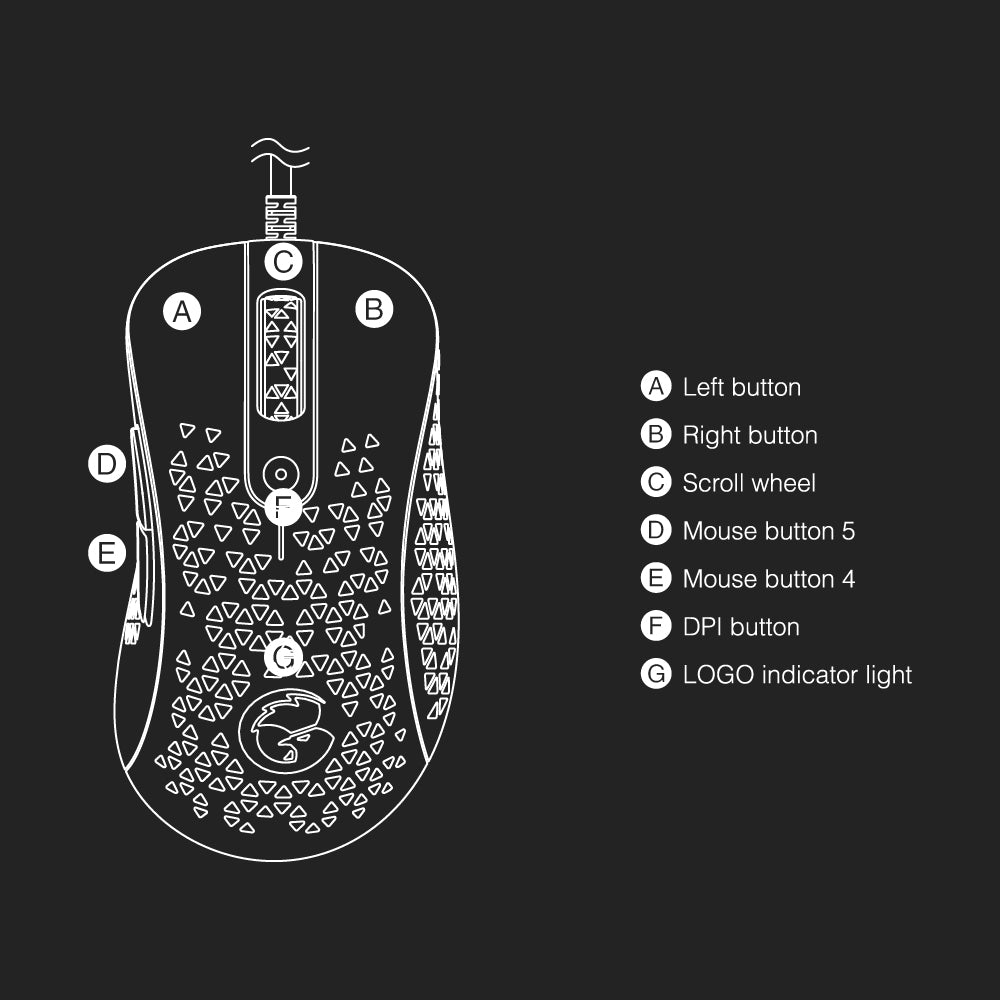
- How to adjust the DPI?
Please see the indicator color in the below chart.
| DPI | Indicator Color |
|---|---|
| 400 | Green |
| 800 | Red |
| 1600 (Default) | Blue |
| 2400 | Yellow |
| 3200 | Orange |
| 6400 | Purple |
| 12000 | White |
- How to adjust the polling rate?
| Polling Rate | Flashing Times |
|---|---|
| 125Hz | White flashing 1 time |
| 250Hz | White flashing 2 times |
| 500Hz | White flashing 3 times |
| 1000Hz (Default) | White flashing 4 times |
- How to adjust the lighting effects?
▪ Seven Colors (Default)
▪ Monochrome Permanent
▪ Monochrome Breathing
- How to adjust the light brightness?
▪ High
▪ Medium (default)
▪ Low
FAQ:
- Does it need to install additional drivers?
No, it doesn’t. Just plug and play.
- Can it be used wirelessly?
No, it can’t.
- What’s the length of the connection cable?
It’s 1.6m / 5.25ft.